Overview
Notification Email, In-App, and SMS Templates allow you to easily customize the messaging that sends from the business to pet owners. RunLoyal offers multiple types of notifications, such as new appointment alerts, appointment reminders, payment requests, agreement signature requests, etc. All three notification types (email, in-app, and SMS) can be updated from the same page. Once these notification templates are set up and enabled, messaging sends automatically to your customers.
Notification templates can be viewed in the following areas:
- Settings > Business Setup > Pet Owner Notification Preferences
- Sending Emails in Business Portal
TABLE OF CONTENTS
- Overview
- How to Edit Notification Email, In-App, and SMS Templates
- Description of Pet Owner Notification Templates
- More Information
How to Edit Notification Email, In-App, and SMS Templates
1. Navigate to Settings > Business Setup > Pet Owner Notification Preferences.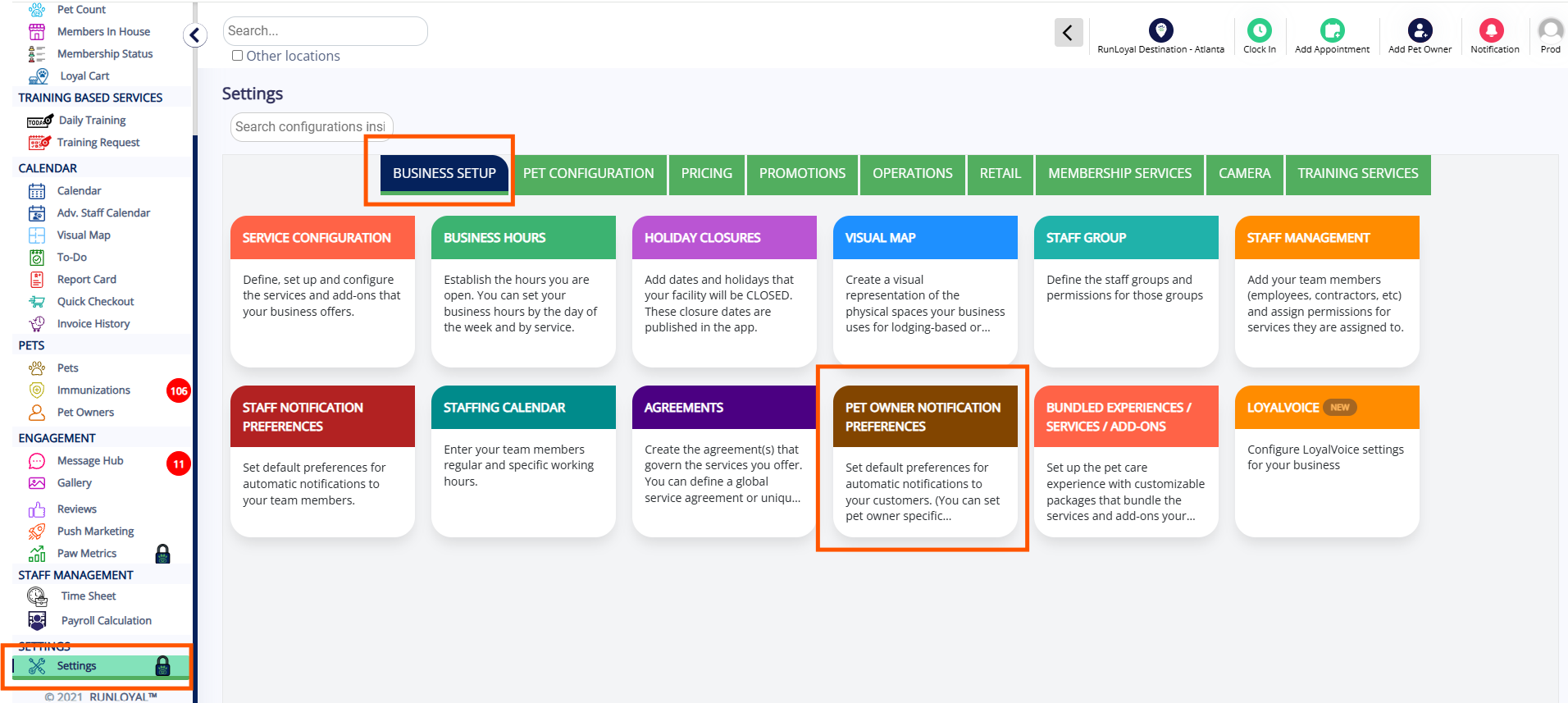
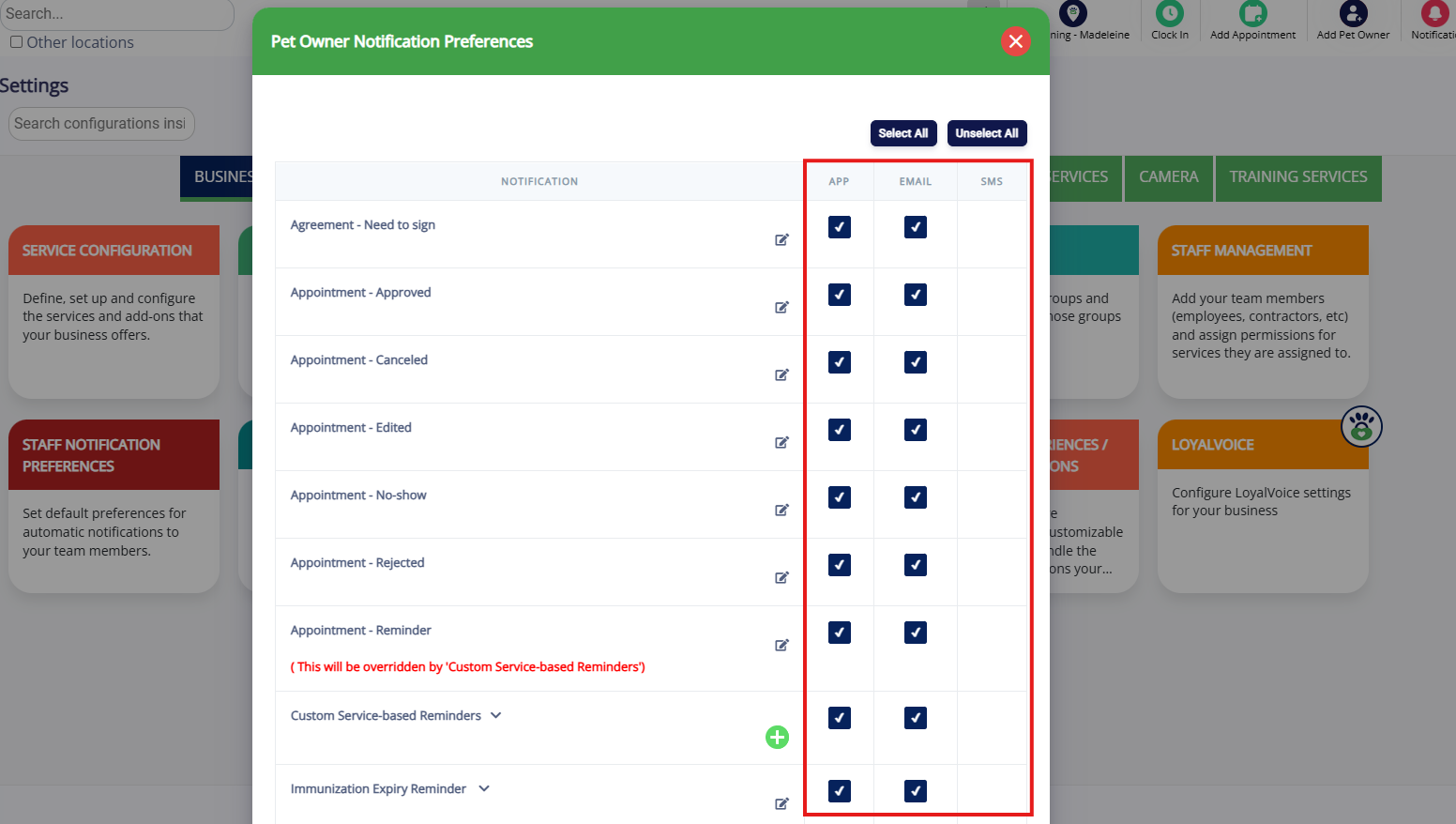
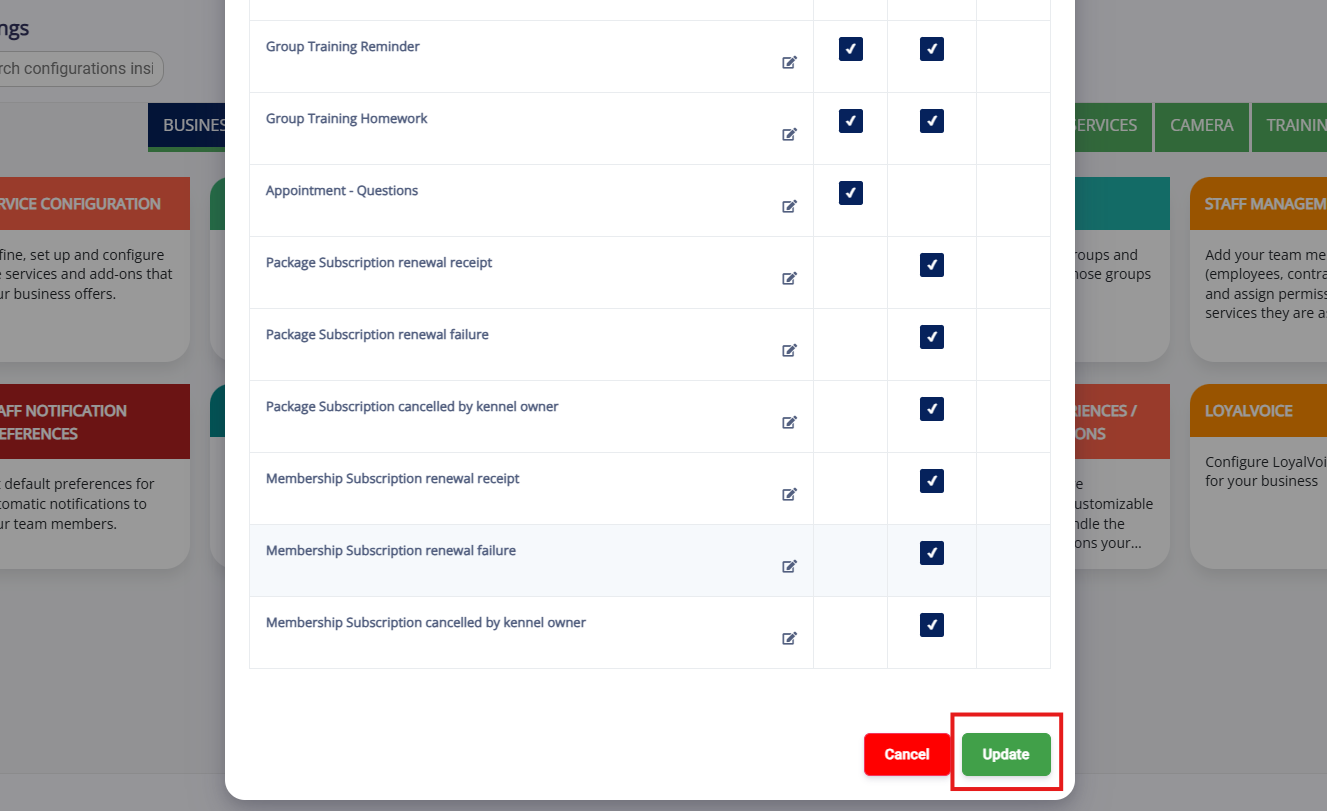
2. Check the box next to each reminder type if that reminder should send an email, in-app notification, or SMS (text message) to the pet owner. A full list of each type of notification and what triggers it to send can be found below.
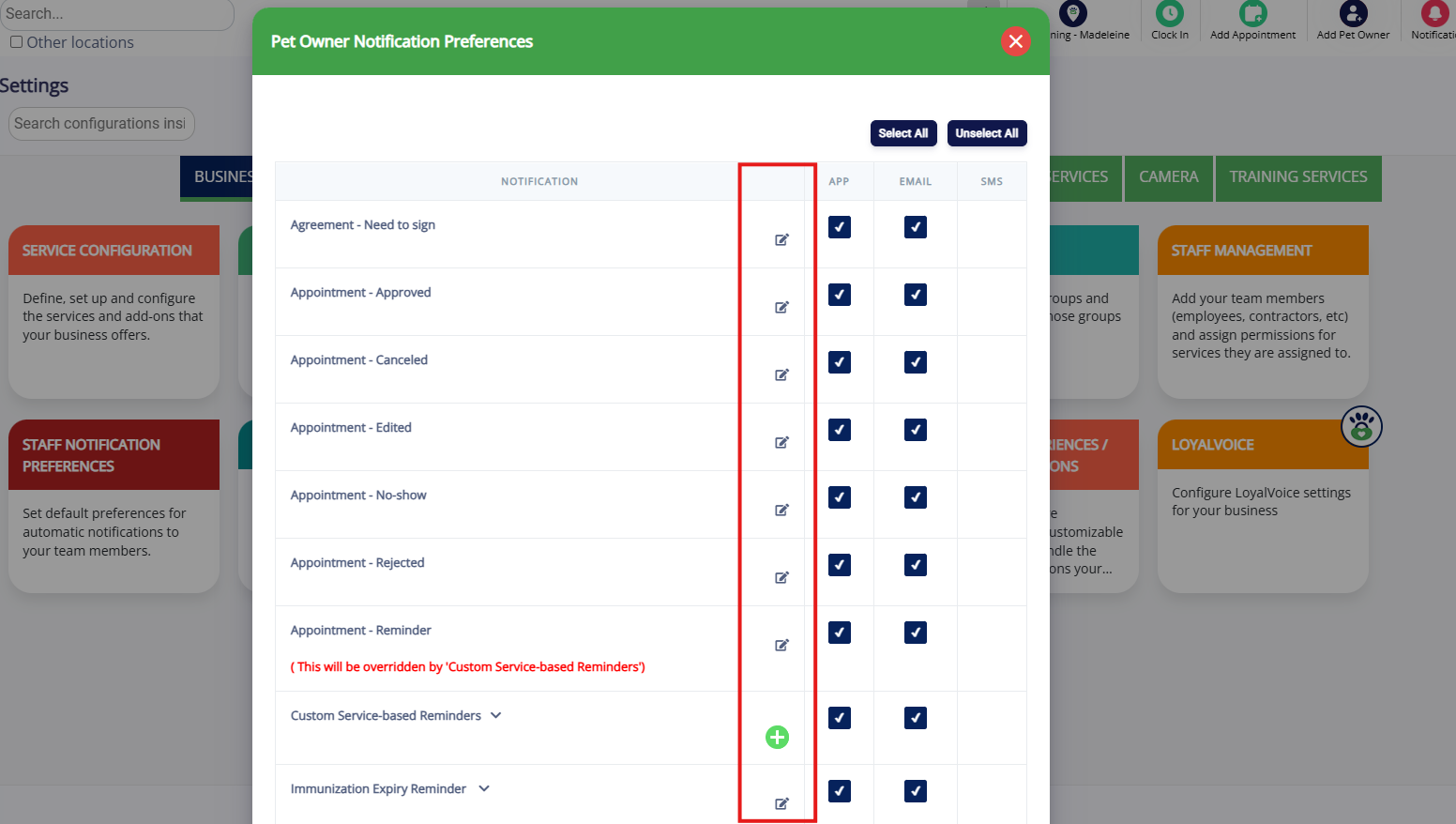
3. To edit the wording of the notification templates, click the Edit pencil icon next to each notification.
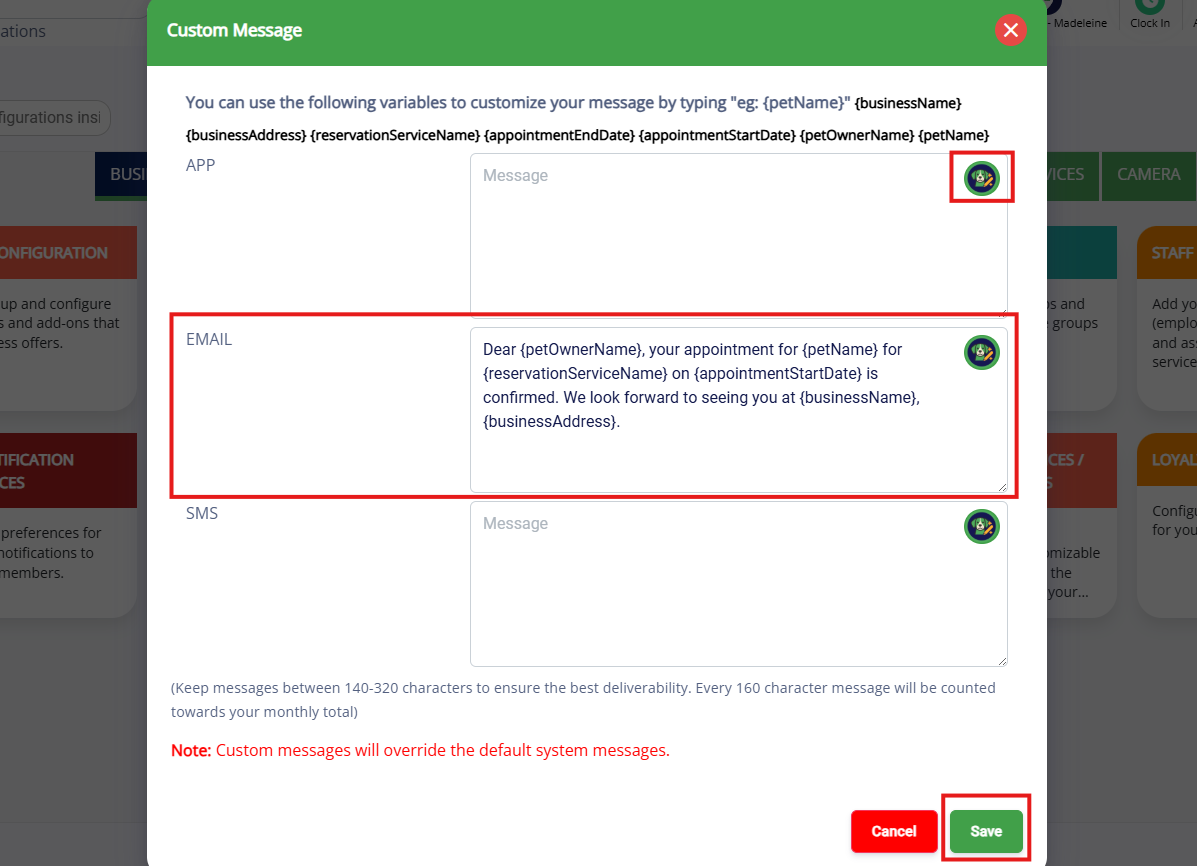
4. When editing the templates, if the template shows blank then it is sending the default messaging when that email sends. You can optionally enter your own custom message specific to your business. You can also click the Scout AI icon and it will write a message for you that you can then further customize. Once your templates are edited, click Save.
5. When all notification templates are toggled on and edited as necessary, click Update at the bottom of the popup to save your changes.
Description of Pet Owner Notification Templates
Each pet owner notification template triggers based on different actions taken in the app, either by a staff user or pet owner. Below is a full list of all notification templates.
Agreement - Need to sign - when business staff user sends email from pet owner profile manually requesting agreement be signed.
Appointment - Approved - when appointment is created on the business side, a request is accepted by the business, or request is auto-approved based on the service settings.
Please note: if the service is staff-based, then the template will display the times for dropoff but not pickup.
Appointment - Canceled - when appointment is cancelled by the business.
Appointment - Edited - when appointment is edited by the business (changing dates, adding/removing services, etc).
Appointment - No-show - when appointment is marked as no-show from Arrivals (can also include no-show fees, more information in the article: Cancellation and No-Show Fees).
Appointment - Rejected - when appointment request from pet owner is rejected by the business.
Appointment - Reminder - when appointment start date is upcoming, sends based on service reminder duration from Settings > Business Setup > Service Configuration. This is the basic reminder for all appointments, but you can also customize based on service type below with the Custom Service-based Reminders template. If custom reminders exist, it will override that basic template
Custom Service-based Reminders - when appointment start date is upcoming, sends based on custom service type. Learn more about customizing appointment reminders specifically in this article: Customize Appointment Reminder Emails
Immunization Expiry Reminder - when pet has immunizations that expire in next 30 days.
Invite to app - when pet parent has signed up and you wish to send their custom invite code to access the mobile app.
Manual Message from Message Hub - when a business staff user sends a custom message from the Message Hub to a pet owner, this template will preface the message.
Membership Freeze charge failure - when pet owner's membership is frozen, and a membership freeze fee is set up to charge regularly while frozen, and frozen fee is attempted to charge but fails.
Membership Freeze charge success - when pet owner's membership is frozen, and a membership freeze fee is set up to charge regularly while frozen, and frozen fee is attempted and succeeds.
Membership Frozen - when pet owner's membership is temporarily frozen to prevent future charges.
Package Expiry Reminder - when package is about to expire.
Push Marketing - when a business staff user sends a custom message via push marketing to multiple pet owners at the same time, this template will preface the message.
Ready for pickup - when business staff user clicks "Ready for pickup" on a checked in appointment to alert the pet owner that the pet is ready to be picked up.
Report card - when report card is created for a pet's appointment.
Request Payment - Deposit - when appointment is created that has a required deposit. This notification should contain a payment link if pet parent is prompted to pay virtually.
Request Payment - Invoice - when business staff user sends a request for payment from an invoice or estimate.
Review (External) Reminder - when pet parent is prompted to leave external review (Google, Yelp, etc).
Review Requested (During Appointment Checkout) - when business manually requests review at checkout screen from pet parent.
Send Invoice Receipt - when business manually sends invoice receipt for closed invoice.
Sign up success - when pet parent successfully signs up on the mobile app or web link. Can also be used as a "welcome" message!
Wait List - when appointment request is placed on the waitlist by a business staff user.
Group Training Purchase - when pet owner successfully purchases a group training class.
Group Training Confirmed - when a training class request is created in the business portal or when a business staff user accepts a training class enrollment request.
Group Training Canceled - when a training class is cancelled by the business.
Group Training Reminder - when appointment start date is upcoming, sends based on service reminder duration from Settings > Business Setup > Service Configuration.
Group Training Homework - when training class has assigned homework that the pet owner needs to complete.
Appointment - Questions - when an appointment has required questions for the pet owner to fill out and business staff user sends request from pet or owner profile.
Package Subscription renewal receipt - when package subscription successfully renews. This is required to send via email.
Package Subscription renewal failure - when package subscription fails to renew, normally due to a credit card issue. This is required to send via email.
Package Subscription cancelled by kennel owner - when business staff user cancels the pet owner's package subscription. This is required to send via email.
Membership Subscription renewal receipt - when membership successfully renews. This is required to send via email.
Membership Subscription renewal failure - when membership fails to renew, normally due to a credit card issue. This is required to send via email.
Membership Subscription cancelled by kennel owner - when business staff user cancels the pet owner's membership. This is required to send via email.
More Information
For more information on sending custom appointment reminders by service type, please refer to this article: Customize Appointment Reminder Emails
Was this article helpful?
That’s Great!
Thank you for your feedback
Sorry! We couldn't be helpful
Thank you for your feedback
Feedback sent
We appreciate your effort and will try to fix the article