Overview
RunLoyal allows businesses to manage refunds for card payments processed through an integrated payment terminal.
Depending on whether the pet owner is available to return to the facility, refunds can be processed through RunLoyal or directly through CardPointe.
Refund Through RunLoyal (Recommended): Process the refund using the integrated payment terminal when the pet owner is present at the facility. This helps maintain accurate invoice balances and financial reporting within RunLoyal.
Refund Through CardPointe: Process the refund directly through CardPointe when the pet owner cannot return to the facility. Refunds processed outside RunLoyal may require additional invoice adjustments to maintain accurate financial records.
TABLE OF CONTENTS
- Overview
- Applicable Business Types
- Applicable Users
- Requirements
- Portal Path
- How to Process a Card Payment Refund
- Important Notes
- Frequently Asked Questions
- More Information
Applicable Users
Business Owner / Kennel Owner
Authorized Staff
Requirements
Before processing a refund, ensure the following:
The business has an active CardPointe merchant account.
The original payment was processed using an integrated payment terminal.
The staff member has the necessary permissions to process refunds.
The original payment transaction can be identified.
The refund amount has been confirmed.
Portal Path
Left-hand Navigation > Invoice History > Closed Invoices > View Invoice (Refund Icon)
How to Process a Card Payment Refund
Option 1: Process the Refund Through RunLoyal (Recommended)
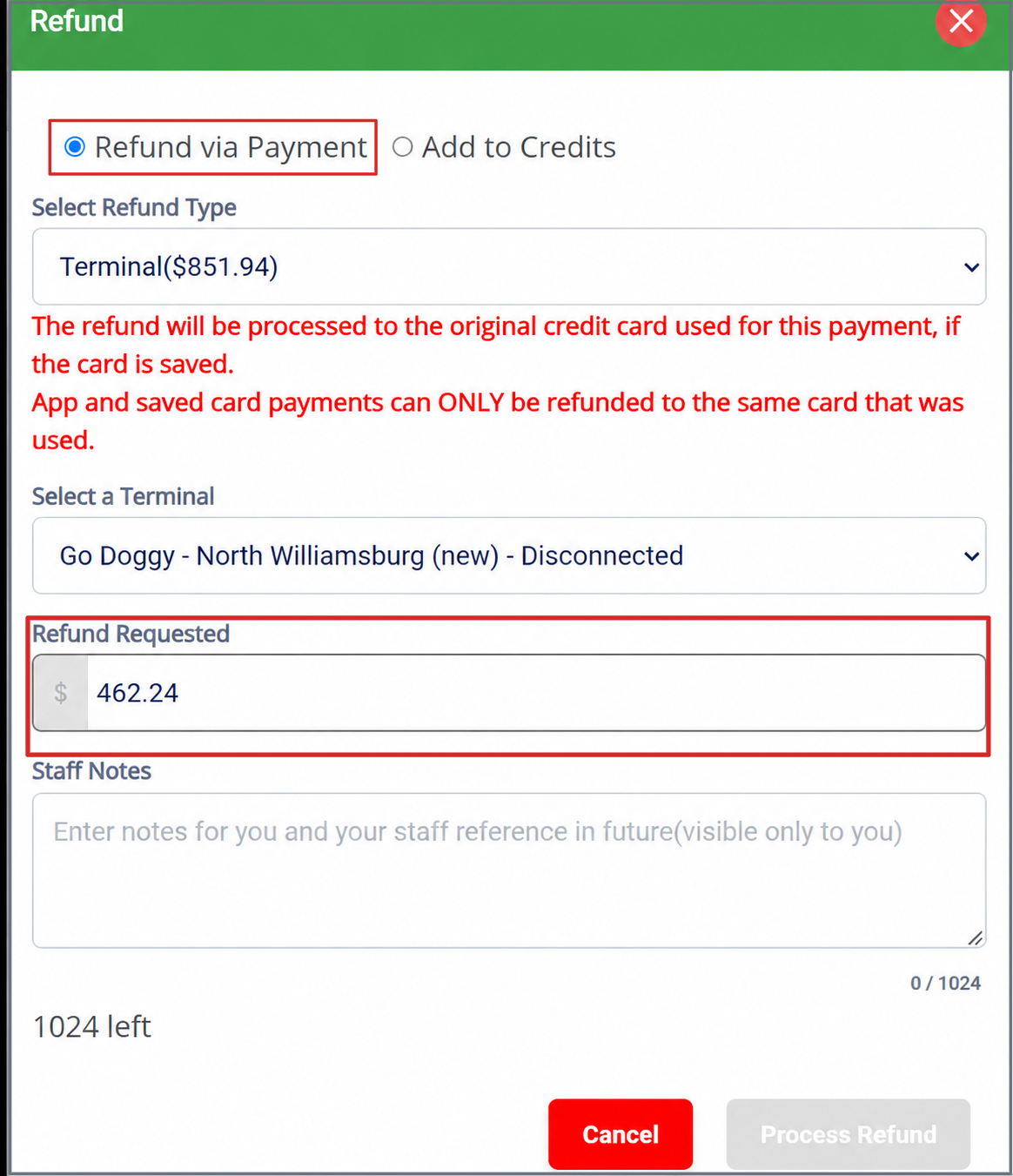
When the pet owner can return to the facility, process the refund directly through RunLoyal using the integrated payment terminal.
Log in to the RunLoyal Business Portal.
Locate and open the pet owner's invoice.
Access the available refund action.
Select the payment transaction that needs to be refunded.
Enter the applicable refund amount.
Follow the prompts to process the refund through the integrated payment terminal.
Complete the refund and verify that the corresponding invoice records are updated.
Processing a Refund Through RunLoyal
Benefits:
Keeps refund activity within RunLoyal.
Helps maintain accurate invoice balances.
Supports consistent financial reporting.
Reduces the need for manual invoice corrections.
Option 2: Process the Refund Through CardPointe
When the pet owner cannot return to the facility, the business can process the refund directly through its CardPointe merchant account.
Log in to your CardPointe account.
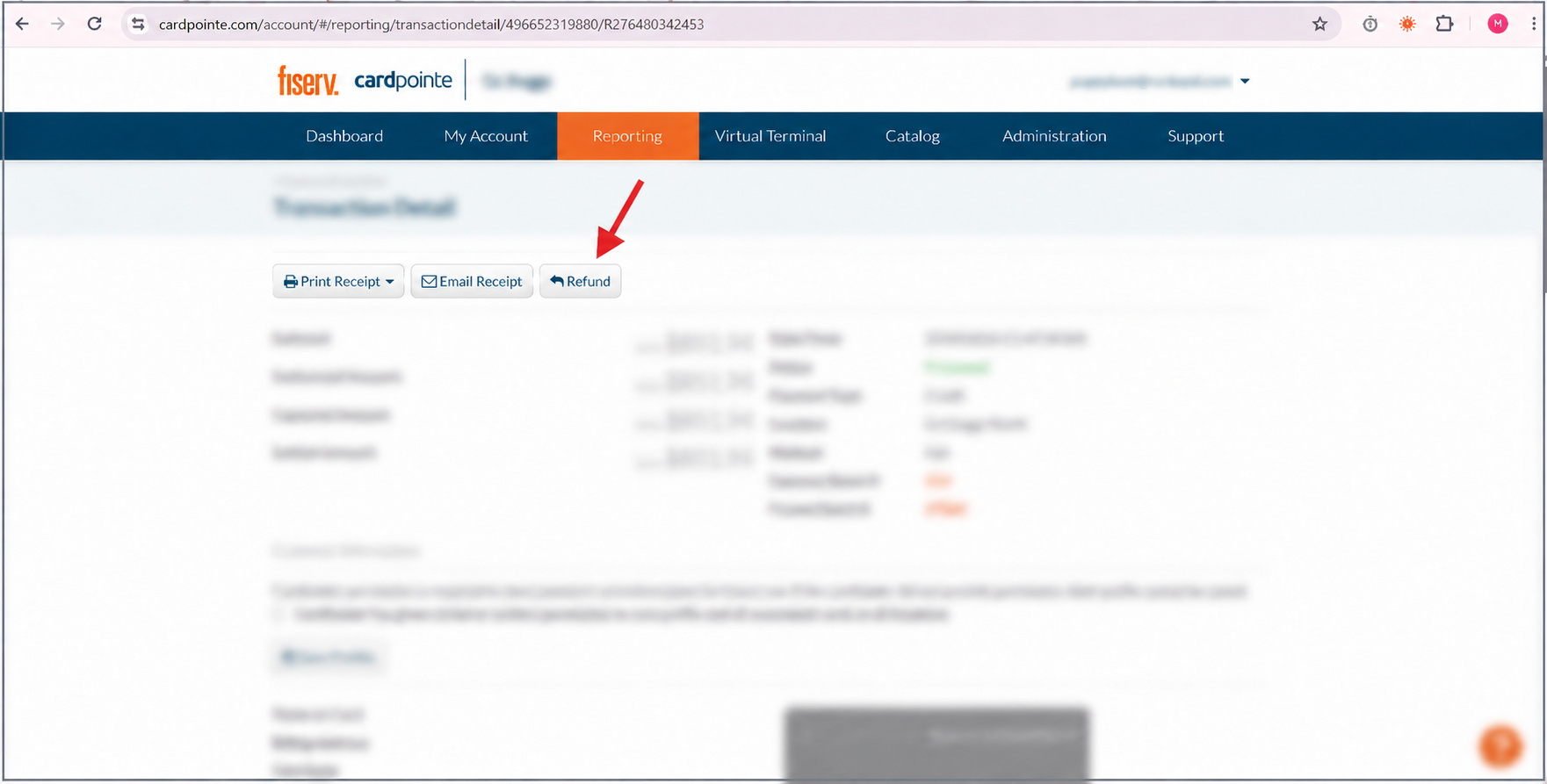
Locate the original payment transaction.
Open the transaction details.
Select Refund.
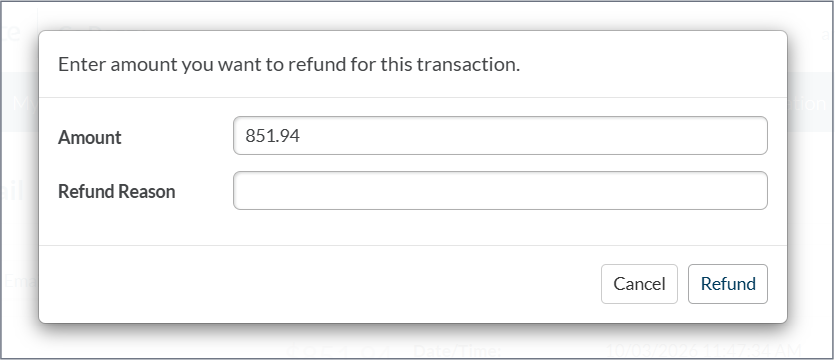
Enter the amount to be refunded.
Review and submit the refund to the original payment card.
Verify the refund status in CardPointe.
1. Locate the Original Transaction in CardPointe
2. You can refund the whole amount or partial payment
Important: Refunds Processed Outside RunLoyal
Refunds processed directly through CardPointe may not automatically update the corresponding invoice in RunLoyal.
If you process a refund through CardPointe:
Record the refunded amount and transaction details.
Contact RunLoyal Support puppylove@runloyal.com after processing the refund.
Provide the relevant invoice number and refund amount.
RunLoyal Support can assist with adjusting the corresponding invoice to maintain accurate records.
Important Notes
Recommended Method: Process refunds through RunLoyal whenever possible to maintain consistent invoice and payment records.
Partial Refunds: If a partial refund is processed directly through CardPointe, notify RunLoyal Support so the corresponding invoice can be reviewed and adjusted.
Original Payment Card: CardPointe refunds are processed against the original payment transaction.
Financial Accuracy: Always verify the refund amount and corresponding invoice balance after processing a refund.
Frequently Asked Questions
Can I refund a card payment if the pet owner cannot return to the facility?
Yes. You can process the refund directly through CardPointe by locating the original transaction and selecting Refund.
Will a refund processed through CardPointe automatically update my RunLoyal invoice?
The corresponding invoice may require an adjustment. Contact RunLoyal Support after processing the refund.
Which refund method is recommended?
Processing refunds through RunLoyal is recommended whenever possible because it helps maintain accurate invoice balances and financial reporting.
Can I process a partial refund through CardPointe?
Yes. CardPointe allows you to enter the amount you wish to refund. Contact RunLoyal Support afterward to ensure the invoice records remain accurate.
More Information
For more information on Setting up your terminal, please refer to this article: Setting up your terminal
RunLoyal Support puppylove@runloyal.com
Was this article helpful?
That’s Great!
Thank you for your feedback
Sorry! We couldn't be helpful
Thank you for your feedback
Feedback sent
We appreciate your effort and will try to fix the article